

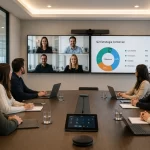





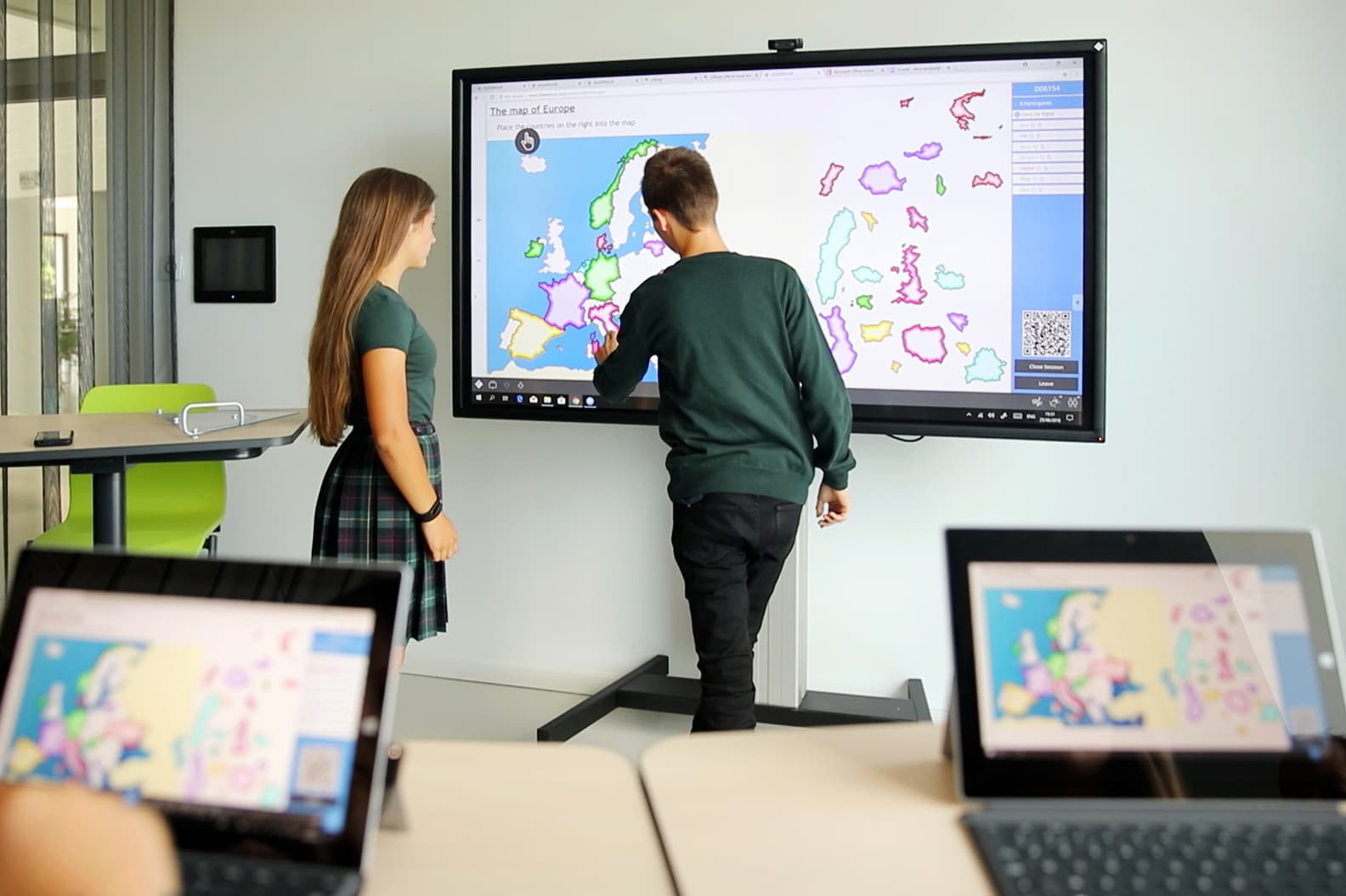



Digital whiteboards are interactive technology solutions that allow users to display content, write, draw, browse the internet, share files, and work collaboratively from a touchscreen or interactive surface. In classrooms, training rooms, and meeting spaces, they help transform traditional lessons and presentations into more visual, dynamic, and engaging experiences. Also known as interactive whiteboards, electronic whiteboards, smart whiteboards, smart boards, touchscreen whiteboards, or interactive displays, these solutions are designed to improve participation, simplify content sharing, and allow teachers, students, trainers, and teams to interact with information in real time. In educational institutions, corporate training rooms, and collaboration spaces, digital whiteboards make it possible to integrate multimedia resources, videoconferencing, educational software, cloud platforms, and connected devices to create more complete learning and collaboration environments. A digital whiteboard is a device or system that combines the functions of a traditional whiteboard with the capabilities of a digital display. It allows users to write on the surface, project content, open documents, play videos, browse the internet, save annotations, and share materials with other users. An interactive whiteboard goes a step further by allowing users to touch, write, move elements, zoom in, interact with applications, and work directly on the displayed content. In practice, many people use the terms digital whiteboard and interactive whiteboard as synonyms, especially when referring to touchscreen displays used in classrooms, training rooms, and meeting spaces. Unlike a conventional whiteboard, a digital whiteboard is not limited to markers or static notes. Teachers, trainers, and presenters can work with images, maps, presentations, videos, interactive exercises, educational applications, online collaboration tools, and shared documents. Depending on the type of solution, the whiteboard can operate using a professional touchscreen display, an interactive projector system, or a combination of hardware and software connected to a computer. Digital whiteboards for classrooms are used to make lessons more visual, participatory, and easy to follow. They allow teachers to explain complex concepts using graphic resources, solve exercises on the screen, save the content worked on during the class, and share it later with students. In corporate environments, digital whiteboards and interactive displays are useful for training sessions, workshops, brainstorming, team meetings, hybrid collaboration, product presentations, and internal communication. They help participants interact with content instead of simply watching a static presentation. Among their most common uses are: In many searches, terms like digital whiteboard, interactive whiteboard, electronic whiteboard, smart whiteboard, smart board, interactive display, or interactive flat panel display are used. Although they are often used as synonyms, there are some important differences. An interactive whiteboard allows students, attendees, or team members to actively participate in the session. They can solve exercises, move elements, answer questions, interact with images, or work on group activities directly from the screen. This helps shift the experience away from a purely lecture-based format and turns it into a more participatory environment. Students and participants do not just listen to the explanation; they can also intervene, test ideas, correct mistakes, and build knowledge together. Digital whiteboards allow the use of images, videos, presentations, graphics, maps, simulations, and multimedia content. This makes it easier to explain complex topics and improve comprehension. Instead of relying solely on text or verbal explanations, teachers and presenters can show visual examples, zoom in on details, compare information, annotate content, and adapt the material based on the pace of the class, meeting, or training session. An interactive digital whiteboard facilitates collaborative work. Students or team members can participate in group activities, solve problems together, share ideas, and build answers collectively. Digital boards, virtual sticky notes, shared documents, collaborative applications, and screen sharing tools can also be used to encourage communication and teamwork within the classroom or meeting room. One of the main advantages of a digital whiteboard is its ability to integrate with online resources, educational platforms, digital libraries, presentation applications, cloud storage, and collaboration tools. This allows quick access to updated materials, complements explanations with external resources, and saves the content worked on so it can be reused in future classes, training sessions, or meetings. Digital whiteboards and interactive displays are also useful in hybrid education and hybrid work models. When combined with cameras, microphones, speakers, and videoconferencing software, they allow remote participants to follow the session, see shared content, and take part in the experience. Because of this, many educational institutions and companies use digital whiteboards as part of a broader hybrid classroom, training room, or collaboration space solution. This type of solution combines a projection surface with a projector and an interactive system. It allows users to work on the projected image, write, point, and use educational or presentation software. It can be an alternative for institutions that already have projection infrastructure, although it requires controlling factors such as lighting, calibration, projector maintenance, and image visibility. The interactive touchscreen display is one of the most modern options. It functions as a large-format professional display with built-in touch capabilities. It does not need an external projector and usually offers better brightness, resolution, and user experience. This type of interactive display is ideal for modern classrooms, universities, training rooms, and corporate spaces looking for a stable, visually clear, and easy-to-use solution. An interactive flat panel display is an all-in-one touchscreen solution designed for professional use. It usually includes high-resolution image quality, multi-touch functionality, connectivity options, integrated software, and compatibility with different devices and collaboration platforms. These displays are commonly used in classrooms, meeting rooms, training centers, and hybrid collaboration spaces because they offer a more reliable and modern alternative to projector-based systems. Some solutions stand out because of the software included. This software can allow users to create interactive lessons, share files, save annotations, work with multiple users, integrate educational apps, connect external devices, and collaborate in real time. The software is a key factor because it defines a large part of the user experience. A good digital whiteboard relies not only on the hardware but also on the tools available for teachers, students, trainers, and teams. In hybrid classrooms and meeting rooms, the digital whiteboard can be integrated with videoconferencing systems, cameras, microphones, speakers, collaboration platforms, room control systems, and content management tools. This ensures that the experience is fluid both for those present in the room and for those participating remotely. Screen size is one of the most important factors. A larger screen ensures that content is clearly visible from the back of the classroom or meeting room and offers a larger workspace for writing, drawing, or displaying multiple elements at the same time. The choice of size should take into account the dimensions of the room, the viewing distance, the number of users, and the type of content that will be displayed. A good digital whiteboard for the classroom, training room, or meeting space must offer a clear image with good resolution and sufficient brightness for well-lit environments. This is especially important when showing small text, graphics, spreadsheets, maps, diagrams, or multimedia content. In educational and corporate spaces, it is advisable to evaluate professional displays designed for intensive and prolonged use. Touch functionality allows users to write, select, move, zoom in, or zoom out elements directly on the screen. Some interactive whiteboards and displays allow multiple simultaneous touch points, facilitating collaborative work among several users. It is also important to evaluate touch precision, response speed, writing comfort, and compatibility with pens or styluses. An interactive whiteboard with Wi-Fi allows users to connect to the internet, access online content, share screens from other devices, and work with cloud resources. It is also important to check compatibility with computers, tablets, laptops, educational platforms, videoconferencing systems, collaboration software, and other devices used by the institution or company. The software defines many of the actual possibilities of a digital whiteboard. Before choosing a solution, it is important to analyze whether it allows saving lessons, sharing annotations, importing documents, working with multimedia resources, connecting remote users, and collaborating with other participants. Intuitive software facilitates adoption by teachers, trainers, and employees, reducing the learning curve and helping users take advantage of the technology faster. In addition to the price of the device, it is important to consider installation, configuration, training, warranty, and technical support. A correct implementation ensures that the whiteboard works reliably and that users can take advantage of it from day one. Maintenance should also be simple, especially for institutions or companies with multiple classrooms, meeting rooms, training spaces, or locations. Interactive digital whiteboards are not used solely in schools. They are also a valuable tool for universities, training centers, businesses, meeting rooms, and internal training spaces. In the educational field, they help improve engagement, facilitate content explanations, and create more appealing lessons. In business environments, they enable training sessions, presentations, workshops, brainstorming sessions, project planning, and collaborative meetings. When integrated with videoconferencing and collaboration solutions, digital whiteboards connect in-person and remote teams in the same workflow experience. Digital whiteboards work best when they are part of an environment designed for collaboration. It is not just about installing a display; it is about thinking about how the space will be used, what devices will be connected, and what experience the users will have. In a classroom, training room, or meeting room, a digital whiteboard can be integrated with cameras, microphones, speakers, computers, control systems, and collaboration platforms. This way, content can be easily shared and all participants can interact, whether they are present or connected remotely. Therefore, when evaluating a digital whiteboard solution, it is also advisable to analyze the complete space: lighting, acoustics, connectivity, furniture, screen placement, user needs, and collaboration goals. A digital whiteboard is a technology solution that allows users to display, write, edit, and share digital content during a class, training session, meeting, or presentation. It can be used to project materials, make annotations, work with multimedia resources, and save the developed content. An interactive whiteboard is a whiteboard or display that allows users to interact directly with the content. Users can touch the surface, write, move objects, open applications, annotate documents, and collaborate in real time. A digital whiteboard allows displaying content in digital format, while an interactive whiteboard also allows users to touch, write, move elements, and work directly on the surface. In practice, many users use both terms as synonyms. Digital whiteboards are used to explain content visually, project multimedia resources, solve exercises, save annotations, share materials, and encourage student participation during class. An interactive display is a professional touchscreen that integrates viewing, interaction, and connectivity into a single device. Unlike some projector systems, it typically offers higher brightness, better resolution, and a more direct user experience. The term electronic whiteboard is often used to refer to digital whiteboards, interactive whiteboards, or touchscreens used in classrooms, training sessions, meeting rooms, or presentations. It is a general way to name this type of technology. A smart whiteboard is a digital whiteboard with advanced interaction, connectivity, collaborative software, and content management features. It can allow writing, screen sharing, internet connection, saving lessons, and working with educational or business applications. A smart board is a commonly used term for an interactive whiteboard or smart touchscreen display. It is usually used to describe technology that allows users to write, touch, share, and interact with digital content in classrooms, meeting rooms, or training spaces. Before buying digital whiteboards, it is advisable to evaluate the size, resolution, brightness, touch precision, connectivity, included software, ease of installation, warranty, technical support, and compatibility with existing devices and platforms. Yes. When integrated with cameras, microphones, speakers, and videoconferencing platforms, digital whiteboards can be used in hybrid classes and hybrid meetings to share content with both in-person and remote participants. Digital whiteboards and interactive whiteboards are key tools for modernizing classrooms, training rooms, meeting rooms, and collaborative spaces. They allow users to create more visual, engaging, and dynamic experiences, integrate digital content, and improve interaction among teachers, students, trainers, employees, and remote teams. Before choosing a solution, it is important to evaluate the type of display, size, touch functionality, connectivity, software, installation, and technical support. Not all digital whiteboards offer the same experience, so it is advisable to analyze the actual needs of the classroom, training room, or collaboration space before making a decision. At Newtech Group, we recommend evaluating professional solutions from i3 Technologies, designed for classrooms, training rooms, collaborative spaces, and corporate environments that need reliable interactive technology.What are digital whiteboards and interactive whiteboards?
What are digital whiteboards used for in classrooms and training rooms?
Differences between digital whiteboards, interactive whiteboards, electronic whiteboards, smart boards, and interactive displays
Concept
What it means
Common use
Digital whiteboard
A solution that allows users to display and work with digital content during a class, meeting, or presentation.
Classrooms, training sessions, presentations, and collaboration spaces.
Interactive whiteboard
A whiteboard or display that allows users to touch, write, move elements, and work directly on the surface.
Dynamic lessons, collaborative learning, training rooms, and interactive presentations.
Electronic whiteboard
A general term used to refer to digital or interactive whiteboards.
Educational institutions, corporate environments, and informational searches.
Smart whiteboard
A digital whiteboard with advanced connectivity, collaboration software, content management, and interactive features.
Modern classrooms, hybrid rooms, meeting rooms, and training spaces.
Smart board
A commonly used term for an interactive whiteboard or smart touchscreen display used in classrooms and meeting rooms.
Schools, universities, corporate training, and hybrid collaboration spaces.
Interactive display
A professional touchscreen display that allows users to interact directly with digital content.
Classrooms, universities, businesses, meeting rooms, and collaboration spaces.
Interactive flat panel display
An all-in-one professional touchscreen display, usually without the need for an external projector.
Modern classrooms, corporate meeting rooms, training centers, and hybrid workspaces.
Main benefits of digital whiteboards and interactive whiteboards
Greater student and participant engagement
More visual and dynamic lessons or presentations
Better group collaboration
Integration with digital content and educational platforms
Greater flexibility for in-person, hybrid, or remote sessions
Types of digital whiteboards and interactive displays
Digital whiteboard with projector
Interactive touchscreen display
Interactive flat panel display
Digital whiteboard with collaborative software
Integrated solutions for hybrid classrooms and meeting rooms
What to consider before buying digital whiteboards
Screen size
Resolution and brightness
Touch functionality
Wi-Fi connectivity and device compatibility
Included software
Installation, support, and maintenance
Digital whiteboards for schools, universities, and businesses
How digital whiteboards improve collaboration spaces
Frequently asked questions about digital whiteboards and interactive whiteboards
What is a digital whiteboard?
What is an interactive whiteboard?
What is the difference between a digital whiteboard and an interactive whiteboard?
What are digital whiteboards used for in the classroom?
What is an interactive display?
What is an electronic whiteboard?
What is a smart whiteboard?
What is a smart board?
What should be considered before buying digital whiteboards?
Can digital whiteboards be used for hybrid classes or hybrid meetings?
Conclusion