




ESTADOS UNIDOS
bandera estados unidos

-

ARGENTINA
bandera argentina
-
BRASIL
bandera mexico
-
MÉXICO
bandera mexico
-
CHILE
bandera chile
-
COLOMBIA
bandera colombia
-
PERÚ
bandera peru
Eventos
Conectando futuro
eventos newtech icon
Events
It doesn't matter where but what you have to say.

What we do

We optimize your workspaces with advanced audiovisual technology to boost productivity and collaboration.
Managed Telephony Services
All comprehensive voice services for Microsoft Teams.
Teams Direct Routing
Voice integration with
Microsoft Teams.
SBC Management
Optimization and management of your voice infrastructure.
PBX Elimination
Upgrade your communication by securely eliminating your PBX.
Adoption and Change Management
Adoption and management to unlock the potential of Microsoft Teams.
BeComm
Unlock seamless connectivity and collaboration within your organization with BeComm.
Ad-Hoc Teams Apps Development
There are no limits for imagination.
Viva Suite
Use all the power that brings Microsoft Tools.
Microsoft 365
Elevate efficiency and collaboration in your business by deploying Microsoft 365.
Adoption and Change Management
Power success with effective adoption and change management.

PTZ Camera for Video Conferencing: What It Is, How It Works, and Which Rooms Need It

|

28 de May de 2026

Share:

facebook icon
linkedin icon
twitter icon
whatsapp icon
link icon
mail icon
telegram icon

Florencia

AV & Collaboration Specialist

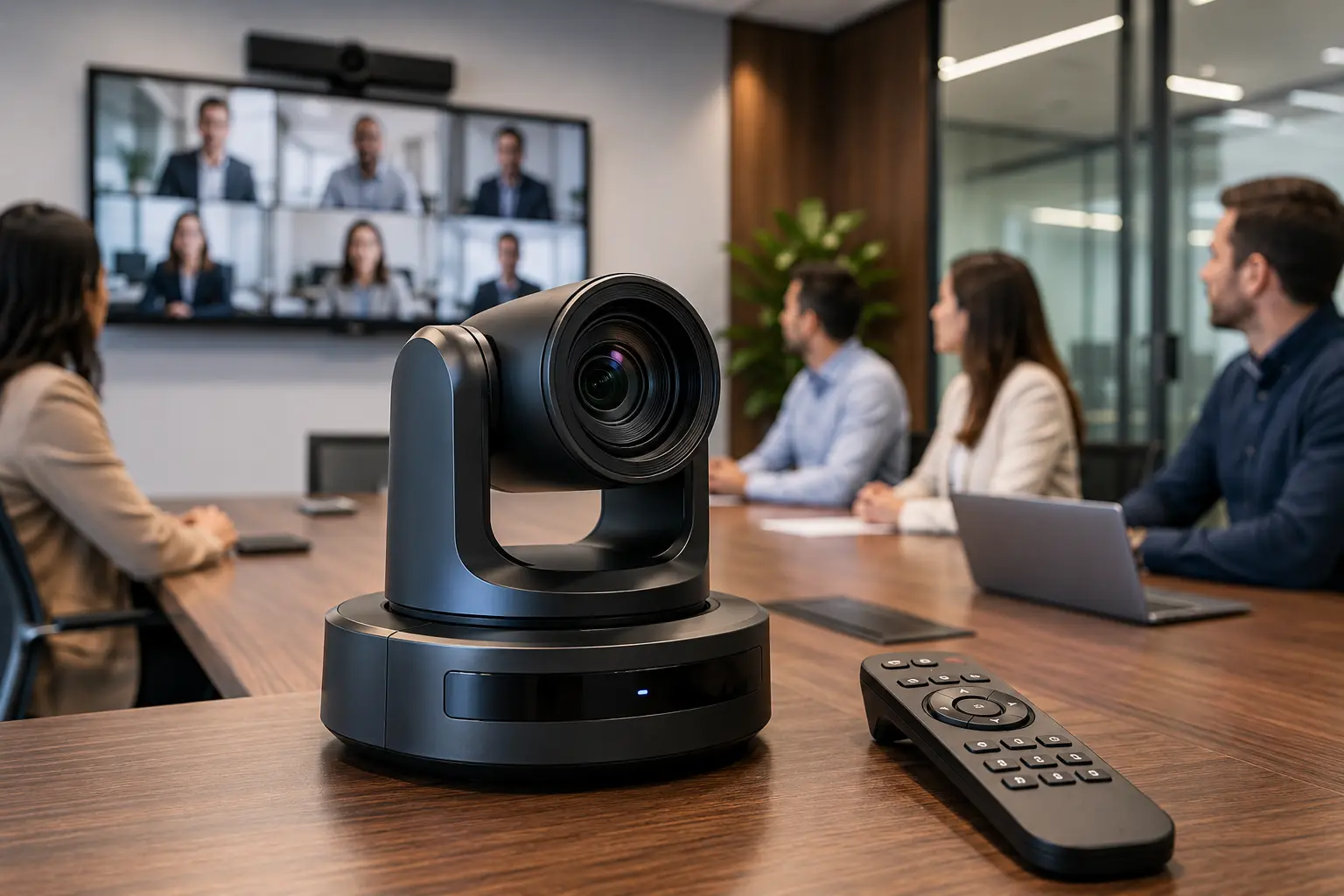
If you have already researched equipment options for meeting rooms, you have probably come across the term PTZ. It is not a brand or a specific model: it is a type of camera with particular features that make it the most suitable solution for certain spaces. Here, we explain what it means, how it works, and when it makes sense to choose it over other options.

What PTZ Means

PTZ stands for Pan, Tilt, Zoom. Each term describes a type of movement the camera can perform:

  • Pan (horizontal movement): the camera moves from left to right and vice versa. This makes it possible to follow a speaker as they move around or cover different areas of a room without physically moving the mount.
  • Tilt (vertical movement): the camera moves up and down. This is useful for capturing a whiteboard at the front of the room or adjusting the framing when participants are at different heights.
  • Optical zoom: unlike digital zoom, which simply crops and enlarges the image while reducing quality, optical zoom uses physical lenses to move closer to a subject while maintaining sharpness. This makes it possible to capture details — a document, text on a whiteboard, or the face of a participant at the back of a large room — without degrading the image.

The combination of these three movements allows a single camera fixed in one point of the room to cover the entire space flexibly, without the need to install multiple cameras.

Difference Between a Webcam, an All-in-One System, and a PTZ Camera

All three types of cameras solve the same problem — video conferencing — but they are designed for different scales:

  • Webcam: fixed angle, no optical zoom, designed for individual use or very small rooms. Plug & play. It does not move.
  • All-in-One video conferencing bar: integrates a camera, microphone, and speaker into a single device. It has a fixed field of view, although usually a wide one, with AI-powered auto-framing. It does not have real camera movement — the “tracking” is an intelligent crop of the image within the available field of view. Ideal for small and medium-sized rooms where the layout is predictable.
  • PTZ: real movement — pan, tilt, and optical zoom — with greater coverage flexibility. Designed for medium and large rooms where the layout may vary or where there are multiple points of attention. It requires integration with the room system; it is not plug & play.

In simple terms: the webcam is for the desk, the All-in-One is for a well-defined medium-sized room, and the PTZ camera is for more complex or larger-scale spaces.

When a PTZ Camera Makes Sense

ptz camera

A PTZ camera is the right solution in these scenarios:

  • Medium-sized room with a moving presenter: if the speaker walks around, points to a whiteboard, or moves while speaking, an All-in-One system cannot follow them beyond its fixed field of view. A PTZ camera can.
  • Room with a whiteboard or relevant visual content: optical zoom makes it possible to capture text on a whiteboard or details on a screen clearly. A webcam will only show a blurry image from a distance.
  • Boardroom or formal meeting room: spaces where high-quality image is part of the meeting experience and participants are distributed around a long table.
  • Auditoriums and training rooms: spaces with many people, where the camera needs to cover a large area and zoom in on the presenter or projected content.
  • Spaces with changing layouts: if the room is used for different types of meetings — workshops, conferences, team meetings — a PTZ camera allows the framing to be reconfigured without moving hardware.

Types of Control: Remote, Presets, and AI

One of the advantages of a PTZ camera is the flexibility in how it can be controlled during a meeting.

Manual Remote Control

An operator controls the camera in real time using a physical controller or software. This is the most common mode in auditoriums and events where there is an in-room technician. It offers the highest level of control but requires a dedicated person.

Programmed Presets

Fixed positions are defined — for example, “wide shot of the room,” “zoom on the presenter,” or “zoom on the whiteboard” — and activated with a button or from the platform interface. This is the most practical mode for rooms that are always used in the same way: the user simply selects the preset at the start of the meeting.

Automatic Speaker Tracking

The camera detects movement or sound and adjusts the framing automatically. Some systems use the audio signal to identify where the voice is coming from; others use computer vision to detect and follow people. This mode is the most convenient for the user but requires proper calibration to avoid distracting framing jumps.

Advanced AI with Multi-Person Auto-Framing

The latest models from brands such as Poly HP and Logitech combine PTZ functionality with artificial intelligence to detect multiple participants simultaneously, switch between frames depending on who is speaking, and present a video composition that recreates the experience of being physically present in the room. It is the most sophisticated option and the one that best supports hybrid meetings with many participants.

Is a PTZ Camera the Right Solution for Your Room?

If your space has more than 10 people, includes presenter movement, has visual content that needs to be captured, or requires high-quality image and cannot depend on a fixed All-in-One system, a PTZ camera is probably the answer.

At Newtech Group, we work with PTZ cameras from Poly, Logitech, i3-Technologies, and Crestron, integrating them into each room ecosystem according to the platform and the real needs of the space.

Explore camera options for professional video conferencing, including PTZ, All-in-One, and AI-powered solutions, or contact us to evaluate your specific room.

Share

facebook icon
linkedin icon
twitter icon
whatsapp icon
link icon
mail icon
telegram icon
Icono de especialistas en comunicaciones y videoconferencias

Talk to a specialist
in communications and videoconferences

If you are looking for advice on technological solutions
in videoconferences please write us!

"*" indicates required fields

This field is for validation purposes and should be left unchanged.

© 2026 All rights reserved | newtechgroup.com

chevron-upchevron-down